



About Figma and Figma to WordPress Conversion
Figma is a cloud-based design platform that allows users to create and collaborate on vector graphics, user interfaces, and prototypes. It is a popular choice for designers and developers alike, due to its ease of use and powerful features.
Figma to WordPress conversion is the process of converting a Figma design into a WordPress theme or website. This can be done manually, or by using a variety of tools and plugins.
There are several benefits to converting Figma designs to WordPress. First, WordPress is a widely used and supported content management system (CMS), which means that there is a large community of users and developers who can help with troubleshooting and support. Second, WordPress themes are highly customizable, which means that users can easily change the look and feel of their website without having to touch the underlying code.
Your will get the free Figma template and live project demo link below –

Benefits of Converting Figma Designs to WordPress
Here are some of the key benefits of converting Figma designs to WordPress:
- Ease of use: WordPress is a user-friendly CMS, which means that it is easy to manage and update your website without having to know how to code.
- Flexibility: WordPress themes are highly customizable, so you can easily change the look and feel of your website to match your brand identity.
- Scalability: WordPress can handle a wide range of website sizes and traffic volumes, so it is a good choice for both small businesses and large enterprises.
- SEO-friendly: WordPress is built with SEO in mind, so you can easily optimize your website for search engines.
- Community support: WordPress has a large and active community of users and developers, which means that there is a wealth of resources available to help you with troubleshooting and support.

How to Convert Figma Designs to WordPress
There are two main ways to convert Figma designs to WordPress:
1. Manual conversion: This involves exporting your Figma design as HTML and CSS, and then manually coding it into a WordPress theme. This method is more time-consuming and requires some knowledge of coding.
2. Using a Figma to WordPress converter: There are a number of tools and plugins available that can help you to convert your Figma design to WordPress automatically. This is the quickest and easiest way to convert your design, but it may not be as flexible as manual conversion.
Here is a step-by-step guide on how to convert your Figma design to WordPress using a Figma to WordPress converter:
- Export your Figma design as a JSON file.
- Upload the JSON file to your WordPress site.
- Install and activate the Figma to WordPress converter plugin.
- Follow the instructions in the plugin to import your Figma design into WordPress.
Once your Figma design has been imported into WordPress, you can customize it and add content to create your website.
Manual Conversion Is The Best
Manual Figma to WordPress conversion is the best option for businesses and individuals who need a high-quality, custom website. It offers greater flexibility, higher quality results, and better SEO-friendliness than using a converter plugin.
Benefits of manual Figma to WordPress conversion:
- Custom WordPress theme tailored to your specific needs
- Optimized website for performance and speed
- Custom security features
- Integration with third-party services and applications
- Complete control over the look and feel of your website
If you have the budget and resources, manual Figma to WordPress conversion is the best way to get the highest quality results.
Free Figma Template For You
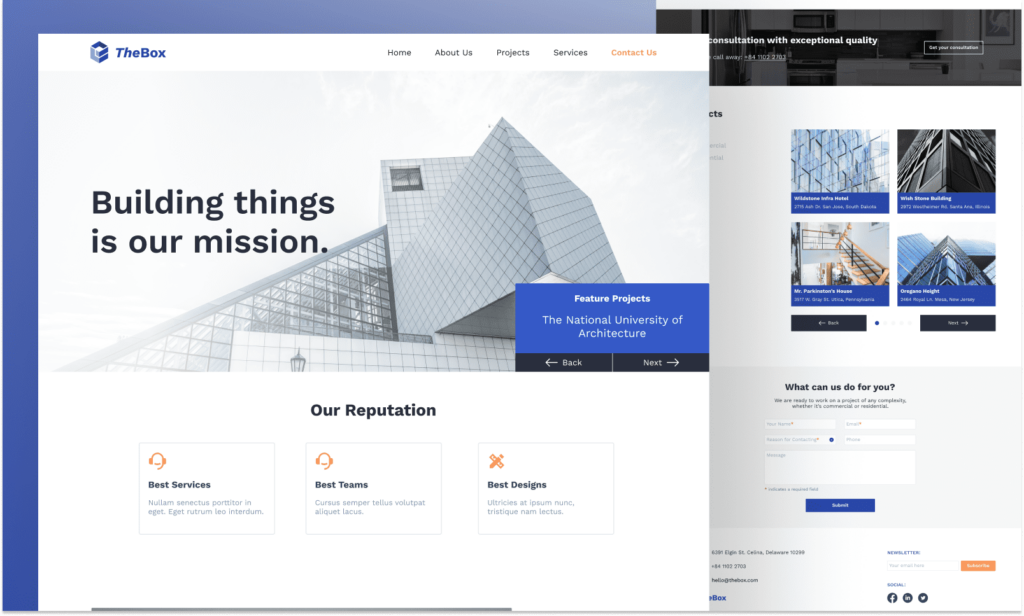
Discover a Free Figma Landing Page Design, with a live demo available below.
If you found this article helpful, please share it on your social media and with your friends. To access more free templates, follow us.
Conclusion
Converting Figma designs to WordPress is a great way to create a professional and visually appealing website without having to know how to code. There are a number of different ways to convert your designs, so you can choose the method that best suits your needs and skills.
If you require professional services to convert your Figma design into a WordPress website, please don’t hesitate to get in touch with us.